- Open Control Panel. By pressing the Windows button or Start button and typing "control panel".
- Click on "Change date, time or Number formats" under "Clock and Region".
- In the new windows that open up, set Shot time to HH: mm.
Showing posts with label Windows. Show all posts
19 November, 2018
How to change Windows 10 clock to 24 Hours format
Just follow 5 step process to switch your clock style in Windows 10 to Hour Format or HH:MM format.
23 March, 2017
How to take screenshot on Windows
When working in a team often times we come across the situation where we need to share what is on our screen. A screenshot is a still picture of what is on your screen.
Following are different ways you can take screenshot on Windows.
1. Print Screen and Ctrl + V
This method works irrespective of the Windows version you are on. So if you are on Windows XP, Windows 7 or Windows Vista this is the best possible and easiest way to take screenshot.
1. Print Screen and Ctrl + V
This method works irrespective of the Windows version you are on. So if you are on Windows XP, Windows 7 or Windows Vista this is the best possible and easiest way to take screenshot.
> Press PrtScn.
> Open Microsoft Paint or any other image editor.
> Press Ctrl + V which stands for paste.
> Open Microsoft Paint or any other image editor.
> Press Ctrl + V which stands for paste.
2. Screen Shot softwares.
Screen shot softwares have run out of business over the time there but still there are many out there. Most of them carry too much ads to be trusted. Fortunately some of them are really simple and easy to use.
One such screenshot software is LightShot.
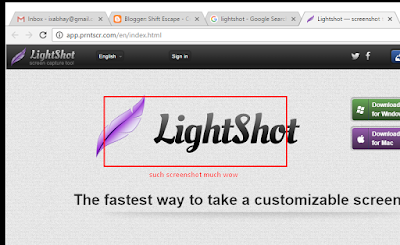
One such screenshot software is LightShot.

Apart from this there is a tool that comes bundled in Windows now called Snipping Tool.
It is simple and very much like LightShot only problem is that there is no way to set a shortcut key for taking screenshot. Which is why it is not as handy as LightShot.
3. Chrome Extensions like Imgur
This isn't all that necessary if you are using LightShot already and it is just limited to taking screenshot of the Chrome Window only. Only good thing about this extension is that it lets you capture whole page as an image, which is nice.
Apparently LightShot is best possible way for taking screenshot on Windows. The installer package is nice and the software is clean. There are no ads in the program although the site where the images are uploaded carry ads but that's still acceptable. Beware of the software that carry useless ads in the installer package and can ruin your computer and browser with ads and ads everywhere.
15 January, 2017
How to stop Ongoing Windows Update
Do you find it frustrating that there is no pause or stop button right next to where the Windows show the update progress?
Follow these steps to stop the ongoing Windows download.
Step 1: Open Run(WINDOWS KEY + R) and type services.msc and press enter.
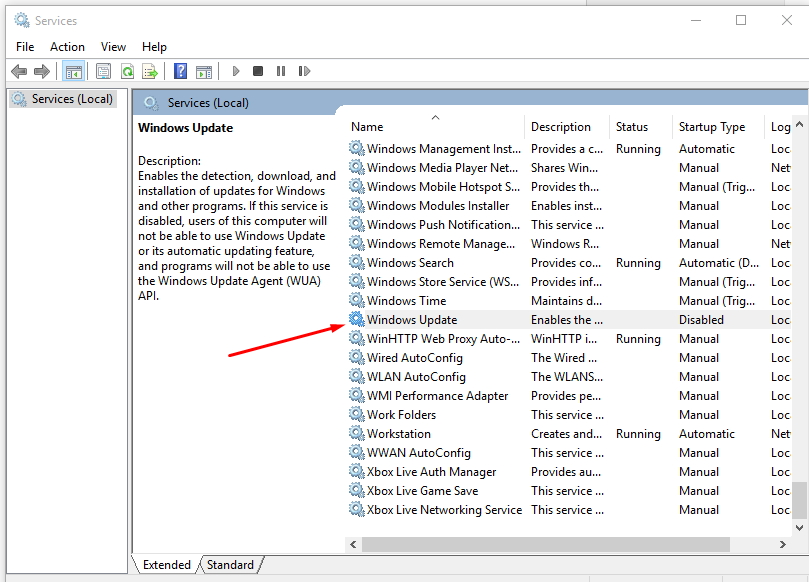
Step 2: Locate Windows Update service and double click it to open.

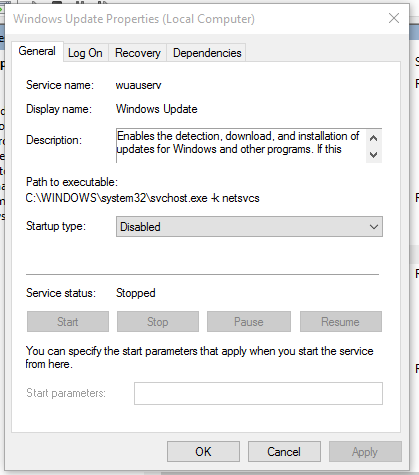
Step 3: From what appears next you can stop, pause the on going Windows update and also prevent Windows from updating itself.

Follow these steps to stop the ongoing Windows download.
Step 1: Open Run(WINDOWS KEY + R) and type services.msc and press enter.

Step 3: From what appears next you can stop, pause the on going Windows update and also prevent Windows from updating itself.

Subscribe to:
Posts (Atom)
Featured Post
Content Writing VS Content Marketing: How are Both Different From Each Other?
Regardless of how long the businesses have been introduced to digital marketing, it is often seen that they confuse the terms of marketing. ...
-
To begin, open your project in the Unreal Engine 5 or a newer version of the editor. Next, access the New C++ Class Dialog by selecting Too...
-
- On Image and Text components that aren’t interacted with you can uncheck “Raycast Target” on it, as it will remove them from any Raycast c...
-
To create a download file button in React.js, follow these steps: Import the necessary dependencies: javascript Copy code import React fro...