Showing posts with label Facebook. Show all posts

23 January, 2017

How to make a Facebook Page and make it popular


If you run a business or a website Facebook is the best possible medium to sxpose it to the right audience. In order to do that you can either adviertise your website or use a page for its promotion.
Anyways you will need a Facebook page.

Following this little guide you will be able to create a Facebook page and make it popular to reach the right audience.


I'm pretty sure you know how to make a Facebook page because it is not that difficult. You can skip this part if you already have a Facebook page.

Step 1: To make a Facebook page go to Create Page.


There are lots of categories as for what you page is about. Take a little time to perfectly categorize your page but even if you set it up in the wrong category it does not matter since the guys at Facebook update your category upon review.

Step.2:Follow page tips to settle everything else related to your page.


Step. 3: Once your page is active it's time for some quality content.
Write some posts, upload some photos share others content. Make atleast 10-15 posts in a span of 3 days whether or not you have an audience. This is so that you have a content which you could put on promotion.

Step. 4: Getting the audience.
The legal hack to do is to use Facebook Ads.
You can check out my previous post on this matter here.


HOW TO USE FACEBOOK TO BOOST YOUR BUSINESS


The not-so-legitimate way of getting the audience is to use third party advertisements or like-generation applications. These are not illegitimate actually just not as effective in some matters as you would expect.
Why and how?
There are sites like likesasap.com, freelikes4you.com, givemelikes.com and many more. Please be ware that some of such sites could be carrying harmful applications or files so at all times avoid download or installing something from them.
Use these sites, setup a page audience, then your ads will do double the benefits.

At last, it all comes down to content. What ever your business is, when you are running something on the Internet it requires content and quality. Once you stop updating your sites or pages you will always see a significant drop in your popularity.

Happy blogging!

18 January, 2017

How to use Facebook to boost your Business

Facebook has been the most popular social from a really long time now. Back in the days of MySpace and Orkut it had competition, but now when we talk about a "Social Network" the first thing that hits your head is Facebook, unless you are from China or Japan maybe.


Since everyone out there must be using Facebook, or majority is, Facebook becomes the best possible way for reaching a targeted audience.
Now there are multiple ways you can achieve your goals and the idea of this post is to clear up the fog for you and decide what's best for you.

Let me tell you a little secret. Facebook Ads are really really "cheap". Not in quality but in price. So without giving it any other thought if you can invest a little in promoting your valuable content, prefer Facebook over Adsense or Bing Ads.

What all options for marketing are available on Facebook?
Facebook Ads carry a lot of variety. You can promote not only your websites and pages but also your individual posts, photos and videos.

Let's say if you run a video production channel on YouTube, instead of promoting your page on Facebook you should promote a particular video link. That way you end up getting more views for your video and the genuinely interested parties do open up the page it is being posted from which means you get the traffic that is more likely to interact with your future posts.

Making a Page for your business.
When you make a page for your business you need to make sure you have the right audience. It is really toxic having just fake likes on your page and no interaction from the people. To make sure that does not happen with you, do "NOT" buy fake likes. Do "NOT" post content a type of content your might not upload in future. That seriously degrades the quality of the page and once that happens your page is likely to die over time.
Now once you have a page you are supposed to share, write upload good content. How?
Upload pictures. Yes!
Just the pictures. Don't update the status, don't share any link. Just upload pictures. If you want to share a link, upload a picture and leave a link in description.
Just make sure, there is a picture there.
People tend to interact more with the images posts than textual ones.

Once you get a good audience on your page you can simply share links even with lower interactions it will be enough to satisfy you. There, you have your own free promotion anytime you want.


29 November, 2016

How to make Live Voting Video on Facebook

tl;dr : OBS Studio is a computer application which lets you stream whatever you feed it to a live streaming server like Facebook.  We make a voting page and stream that live.

Download link: https://obsproject.com/download

Now you need something to stream. You can use any web page for this but since we are making a Facebook live voting, we will go with this voting polls.
I found this on a Quora answer. Link: https://react.cast.net.au/polls/

1. Create a poll using this and copy the url.

2. Now open your OBS Studio.
 

There click on the + sign above the Source to see the above tip menu. Select source as BrowserSource to enter the url we copied in previous step.

3. We need to setup live video.
Go to your Facebook page and click on Publishing tools. 


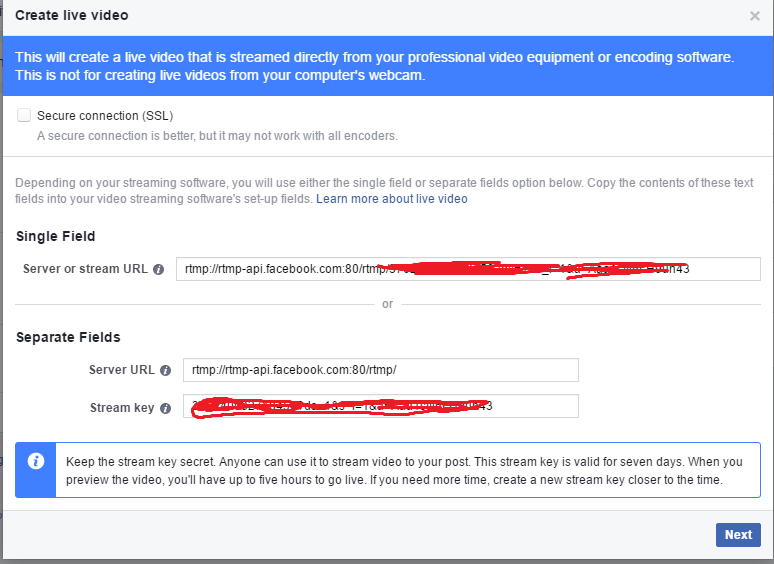
From there create a live video

Upon creation you will get your stream key and url. We need to fill these in the OBS studio's settings.
OBS setting in on the bottom right side of the OBS studio. Click on Stream and enter the respective values. You can also adjust or mess around with your live video's settings here.

4. Click on Start Streaming and your voting should be live in seconds.

12 November, 2016

How to delete images from your Facebook page?


Notice that there is no 'delete' button
So you can't delete any of the image you uploaded to Facebook? Because you can't find the delete button. Right?

Here's the quick fix for this problem. Meanwhile I'm pretty sure people at facebook are working at some solution.

The solution is to use the mobile website of facebook. Please note that I did not say mobile app!
You have to use the Facebook's Mobile SITE.
Link: m.facebook.com

Once you open this url, go to your page, open the image you want to delete and click on more options as shown in the image below.


And click on edit image. You will see the delete button afterwards.


Let me know your thought.

Featured Post

Content Writing VS Content Marketing: How are Both Different From Each Other?

Regardless of how long the businesses have been introduced to digital marketing, it is often seen that they confuse the terms of marketing. ...